How to Read Your Electric Meter and Track Home Electricity Use

Find your meter, record the cumulative kWh reading and the time, take a second reading later, and subtract the earlier reading from the later one to estimate electricity used over that interval; use your utility's online portal for more detailed data, and never open the meter enclosure, break a utility seal, or attempt any wiring or calibration work yourself.
An electric meter tells you how much energy your home has used, but most homeowners have never actually read one.
The U.S. Energy Information Administration explains that electricity is measured in kilowatt-hours, and that this is different from kilowatts, a distinction that matters once you start comparing meter readings over time. Utilities including Con Edison, PG&E, and LADWP each publish their own instructions for reading their meters, because the exact display and registers can vary by utility and meter type.
This guide covers observation only: how to find your meter, read the display, calculate usage between two readings, and use your utility’s portal for more detail. It does not cover opening the meter, working on wiring, or anything beyond looking at the display from outside the enclosure.
The short answer
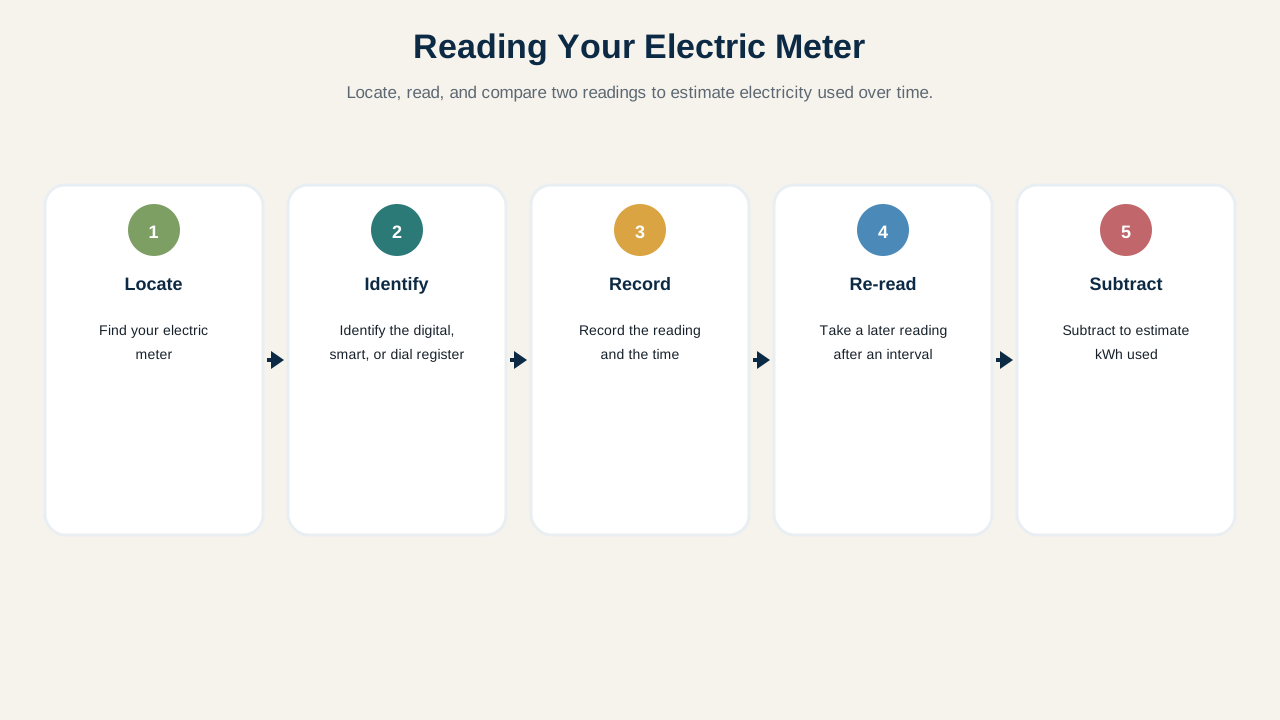
- Locate your electric meter, usually on an exterior wall, in a basement, or in a utility room.
- Identify whether it is a digital, smart, or analog dial meter.
- Record the current cumulative kWh reading and the date and time.
- Take a second reading later: an hour, a day, or a billing cycle apart.
- Subtract the earlier reading from the later reading to estimate kWh used over that interval.
- Check your utility’s online portal, if available, for more detailed interval data.
- Remember that kW and kWh measure different things: rate versus total energy.
- Never open the meter enclosure, break a utility seal, or attempt wiring or calibration work yourself.
kW and kWh Are Different
A kilowatt (kW) measures the rate at which power is being used at a given moment. A kilowatt-hour (kWh) measures the total amount of energy used over time. It is what your utility bills you for.
EIA’s explanation is useful here: running a 1,000-watt appliance for one hour uses 1 kWh. The meter tracks cumulative kWh, not instantaneous kW, which is why a single reading only tells you a running total, not what is happening right now.
Locate the Correct Meter
Most homes have one electric meter, typically mounted on an exterior wall near the service entrance, though it can also be in a basement, a utility closet, or a dedicated meter room depending on the home’s construction and local utility practice.
If your home has multiple units or a detached structure with separate service, confirm which meter corresponds to which address or unit before recording readings. Utilities including Con Edison and LADWP note that meter location and numbering conventions can vary.
Digital and Smart Meters
Digital meters typically display a number directly, sometimes cycling through several screens that may include cumulative kWh, rate information, or diagnostic codes depending on the utility and meter model.
Smart meters, which many utilities including Con Edison and PG&E have deployed, may show a similar display while also transmitting usage data to the utility automatically. Follow your specific utility’s instructions for which screen or register represents your cumulative usage, since the exact sequence can differ between manufacturers and utilities.
Analog Dial Meters
Older analog meters use a set of dials, each with a pointer that moves clockwise or counterclockwise depending on its position in the sequence. Reading them correctly means reading each dial in order and understanding which direction each one turns.
Because the exact reading convention for dial meters can vary, and misreading a dial is a common source of error, follow your own utility’s published instructions rather than a generic rule. Con Edison and LADWP both publish step-by-step dial-reading guidance for their own equipment.
How to Calculate Usage Between Two Readings
Once you have two cumulative kWh readings and know the time between them, the calculation is simple subtraction. For example, a reading of 24,510 kWh followed by a reading of 24,542 kWh taken 24 hours later means 32 kWh were used over that day.
This kind of simple before-and-after comparison is a practical way to spot-check usage around a specific event (for example, before and after a change in habits) without needing your full utility portal.
Smart-Meter Portals May Be More Useful Than the Physical Display
If your utility offers a smart-meter customer portal, such as Con Edison’s smart meter dashboard or PG&E’s SmartMeter tools, it may show hourly or daily usage broken down in ways that are far easier to work with than manually reading the physical meter repeatedly.
For homeowners who want to build a real picture of when and how much electricity they use, the portal is usually the better starting point, with the physical meter serving as a way to verify or spot-check that data.
Do Not Use the Meter as an Appliance-Level Diagnostic Tool
The meter measures total household usage, not usage by individual appliance or circuit. A rising total tells you something changed, but it does not by itself tell you which appliance is responsible.
If you are trying to understand why usage jumped, or whether a specific system like heating, cooling, or a large appliance is the driver, a home energy audit is a more appropriate tool than trying to isolate individual loads from the meter alone. If the jump seems tied to comfort in one specific space rather than the whole house, our guide to figuring out why one room runs hotter or colder than the rest is a more targeted starting point than the meter.
Solar and Net Metering Change the Display
Homes with solar panels or other net-metered systems may see a meter that displays delivered, received, imported, and exported energy separately, or a single net number depending on the meter type and utility program.
Do not assume a single kWh number always means the same thing in a net-metered home. If your home has solar or battery storage, use your utility’s specific guidance on how your particular meter or portal presents that data.
Time-of-Use Rates Are a Billing Layer
Some utilities bill electricity differently depending on the time of day it was used. That billing structure sits on top of the raw kWh data. The meter or portal may show when energy was used, but the price for that energy depends on your specific rate plan.
If your bill seems inconsistent with your usage pattern, check whether you are on a time-of-use or tiered rate plan before assuming there is a metering problem.
Safety Boundary: Look, Do Not Manipulate
Reading the meter means looking at the display from outside the enclosure. It does not mean opening the meter, breaking or tampering with a utility seal, working inside the meter enclosure or service panel, touching any conductors, or attempting to calibrate or adjust the meter.
Con Edison’s electric safety guidance addresses tampering with metering equipment directly, and utility repair-responsibility pages make clear that the meter and related equipment are generally the utility’s responsibility to service, not the homeowner’s. If something about the meter needs to change (a suspected fault, a required upgrade, or a service issue), contact your utility rather than attempting it yourself. This observation-only boundary is the same principle behind testing a GFCI outlet safely using its built-in TEST button rather than opening any electrical equipment yourself.
What if the Meter Looks Damaged?
If you notice a cracked enclosure, scorch marks, unusual sounds, burning smells, a broken seal you did not break, or anything else that looks wrong, do not touch or open the meter. Contact your utility to report the issue.
Do not treat a visibly damaged meter as a DIY project under any circumstances. This is squarely utility territory, both because of electrical risk and because the meter is typically utility-owned equipment.
A Meter-Tracking Table
| What you observe | What it suggests | What to do |
|---|---|---|
| Two readings show expected daily variation | Normal use pattern | Continue routine tracking if useful |
| Usage jumps sharply between readings | Something changed in the home | Consider a home energy audit |
| Meter has multiple unlabeled screens | Utility-specific display sequence | Check your utility’s own reading instructions |
| Smart-meter portal available | More detailed data than manual reads | Use the portal as your primary tracking tool |
| Home has solar/net metering | Display may show import/export separately | Follow utility-specific net-metering guidance |
| Bill and meter seem inconsistent | May be rate structure, not a metering error | Check for time-of-use or tiered billing |
| Meter enclosure looks damaged | Possible utility equipment issue | Contact the utility; do not touch it |
| Broken seal you did not break | Possible tampering or utility service event | Contact the utility promptly |
Build a Simple Energy Baseline
Recording a reading at the same time each day or week, alongside notes about anything unusual (a new appliance, a change in occupancy, a season change) can build a simple baseline you can compare future readings against.
This is a modest, low-effort habit, not a substitute for a professional audit. It is most useful for noticing when something has clearly changed, at which point a more structured look, such as a home energy audit, can help identify the cause.
If Your Bill and Meter Seem Inconsistent
Before assuming a billing error, check the obvious explanations: a rate change, a time-of-use structure, a longer or shorter billing period than usual, or a seasonal shift in use. Compare your own meter reading to the reading your utility used for the bill, when that information is available.
If the discrepancy remains unexplained after checking these factors, contact your utility directly. They are the appropriate party to investigate a suspected metering or billing issue, not a DIY project.
Use the Meter as Evidence
The meter is a simple, honest record of how much electricity your home has used. Reading it correctly, understanding the difference between kW and kWh, and using your utility’s portal for detail turns that record into something useful.
What it is not is a tool for opening, adjusting, or diagnosing individual circuits. When something about the meter itself seems wrong, or you need appliance-level detail, hand that part off to your utility or a qualified professional rather than treating the meter as a DIY project.
Sources and further reading
We prioritize primary and authoritative sources. The sources below support the factual and technical guidance used in this article.
Practical Homeownership provides general educational guidance. Home conditions, local rules, manufacturer requirements, and the appropriate professional scope can vary.